Thanks for your feedback!
EDIT
This interceptor is used to obfuscate selected data (present in the header or body of the request or response) from Trace logs.
To create Trace logs (accessed by clicking the  icon), you must use the Log interceptor .
If you wish the data to be encrypted rather than obfuscated, this can be configured in the Log interceptor itself. icon), you must use the Log interceptor .
If you wish the data to be encrypted rather than obfuscated, this can be configured in the Log interceptor itself.
|
To configure the Log Obfuscation interceptor, you must inform the Location (body or header) of the information to be hidden. If the information that you want to ommit is located in the body of the request, inform a custom regular expression (Custom regex) to identify this information. If it is in the header, inform the Attribute, in lowercase. At last, define the symbols to be used in its place (in the field Replace to).
| The Replace to field also accepts backreferences, which makes it possible to preserve parts of the original value in the log — such as the first and last digits of a document number. See Preserving part of the original value. |
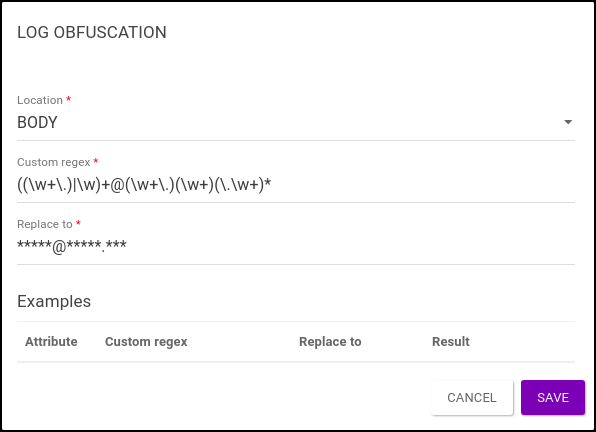
| It is possible to hide multiple pieces of information with a single Log Obfuscation interceptor using a suitable regular expression (as explained here). This is valid for information located in the header of the request. |
Imagine that the body of a request contains the following information:
{
  "name": "Jonathan Crane",
  "alias": "Scarecrow",
  "baseOfOperations": [
    "Gotham City",
    "Arkham Asylum"
  ],
  "status": {
    "alignment": "bad",
    "citizenship": "american",
    "maritalStatus": "single",
    "occupation": [
      "anarchist",
      "serial killer",
      "former psychiatrist",
      "university professor"
    ],
    "active": true
  },
  "characteristics": {
    "gender": "male",
    "height": 1.83,
    "weight": 64,
    "eyes": "blue",
    "hair": "brown"
  }
}
You have to create a suitable regular expression to hide a field.
For example, if you want to obfuscate the "name" field, you can add the following settings:
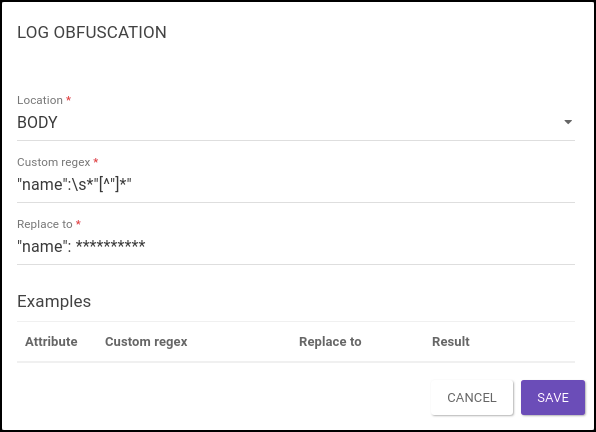
As a result, Trace will show the following log for this request:
{
  "name": **********,
  "alias": "Scarecrow",
  "baseOfOperations": [
    "Gotham City",
    "Arkham Asylum"
  ],
  "status": {
    "alignment": "bad",
    "citizenship": "american",
    "maritalStatus": "single",
    "occupation": [
      "anarchist",
      "serial killer",
      "former psychiatrist",
      "university professor"
    ],
    "active": true
  },
  "characteristics": {
    "gender": "male",
    "height": 1.83,
    "weight": 64,
    "eyes": "blue",
    "hair": "brown"
  }
}
To obfuscate the "occupation" field, you can add the following settings:
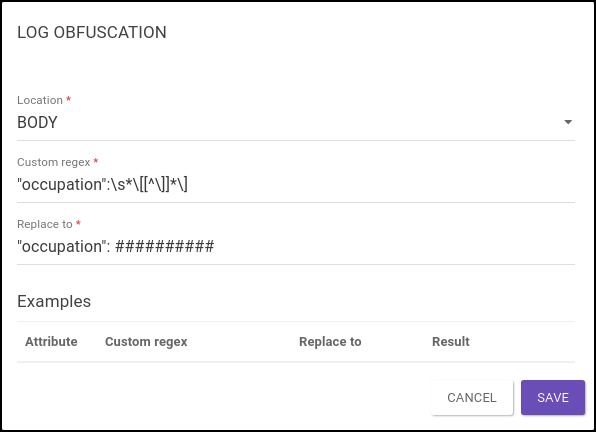
As a result, Trace will show the following log for this request:
{
  "name": "Jonathan Crane",
  "alias": "Scarecrow",
  "baseOfOperations": [
    "Gotham City",
    "Arkham Asylum"
  ],
  "status": {
    "alignment": "bad",
    "citizenship": "american",
    "maritalStatus": "single",
    "occupation": ##########,
    "active": true
  },
  "characteristics": {
    "gender": "male",
    "height": 1.83,
    "weight": 64,
    "eyes": "blue",
    "hair": "brown"
  }
}
Finally, to obfuscate the "characteristics" field, you can add the following settings:
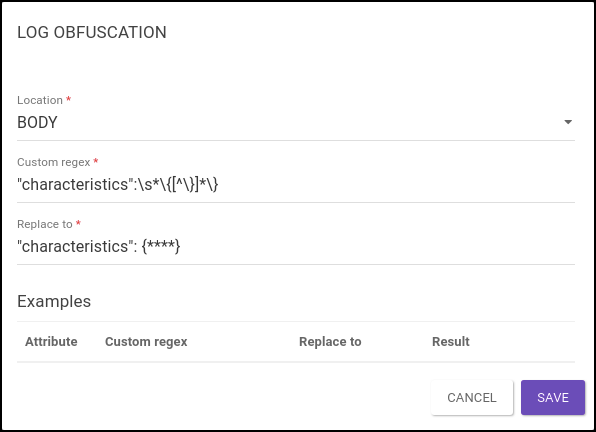
As a result, Trace will show the following log for this request:
{
  "name": "Jonathan Crane",
  "alias": "Scarecrow",
  "baseOfOperations": [
    "Gotham City",
    "Arkham Asylum"
  ],
  "status": {
    "alignment": "bad",
    "citizenship": "american",
    "maritalStatus": "single",
    "occupation": [
      "anarchist",
      "serial killer",
      "former psychiatrist",
      "university professor"
    ],
    "active": true
  },
  "characteristics": {****}
}
Combining those three interceptors sequentially, Trace will show the following Log for this request:
{
  "name": **********,
  "alias": "Scarecrow",
  "baseOfOperations": [
    "Gotham City",
    "Arkham Asylum"
  ],
  "status": {
    "alignment": "bad",
    "citizenship": "american",
    "maritalStatus": "single",
    "occupation": ##########,
    "active": true
  },
  "characteristics": {****}
}
However, a better way to obfuscate multiple fields is to use a single comprehensive regular expression (see examples below).
To obfuscate information contained in the header of the request, select the location and inform the attribute.
| The attribute must be written using lowercase letters. |
Attributes entered in capital letters or starting with a capital letter will not be hidden and thus will appear in the Trace log.
Example configuration to hide the authorization attribute:
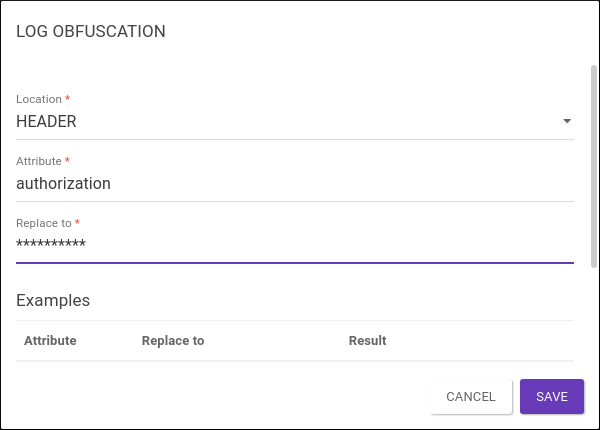
As a result, Trace will show the following log for this request:
host: api-testing.sensedia.com
authorization: **********
user-agent: PostmanRuntime/7.28.4
accept: */*
postman-token: 1234a-bcd5-67abc-defg789xyz
accept-encoding: gzip, deflate, br
x-forwarded-for: 123.45.678.900
x-forwarded-proto: https
x-envoy-external-address: 123.45.678.900
x-request-id: abcdefg-456f-789g-00gh-hijk10
content-length: 0
Configure one Log Obsfuscation interceptor for each attribute you want to obfuscate. For header attributes, you can’t configure multiple information within the same interceptor.
See below how to obfuscate multiple information from fields that are in the body of the request.
When the data set is part of a JSON, a regular expression for multiple information follows the structure:
(?<=(<keys>):)\s*(<regex_types>)
| The "\s*" of the regular expression is used to ignore any white spaces between key and value. |
Both keys (information) and regex for each type of value must be separated by "|".
The regex for the corresponding value types are:
numbers, booleans and null: [\+\-\w.]+
strings: "[^"]*"
simple arrays: \[[^\]]*\]
simple objects: \{[^\}]*\}
Now, imagine that the body of a request contains the following information:
{
  "name": "Pamela Lillian Isley",
  "alias": "Poison Ivy",
  "baseOfOperations": "Gotham City",
  "status": {
    "alignment": "neutral",
    "citizenship": "american",
    "maritalStatus": "single",
    "occupation": [
      "scientist",
      "eco-terrorist"
    ],
    "active": true
  },
  "characteristics": {
    "gender": "female",
    "height": 1.68,
    "weight": 50,
    "eyes": "green",
    "hair": "red"
  }
}
For example, to simultaneously hide the "name", "occupation" and "characteristics" fields, you can add the following settings:
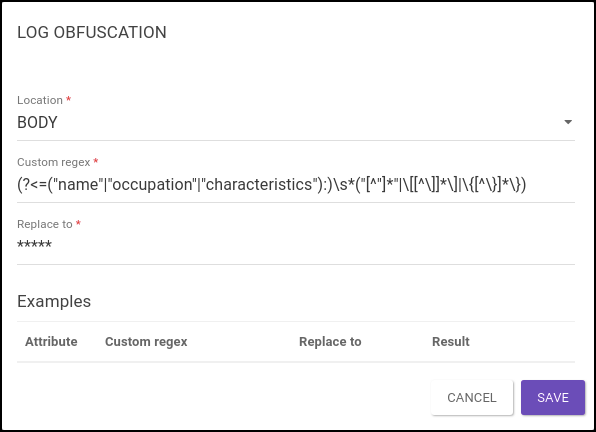
As a result, Trace will show the following log for this request:
{
  "name":*****,
  "alias": "Poison Ivy",
  "baseOfOperations": "Gotham City",
  "status": {
    "alignment": "neutral",
    "citizenship": "american",
    "maritalStatus": "single",
    "occupation":*****,
    "active": true
  },
  "characteristics":*****
}
On the other hand, to simultaneously hide the "name", "citizenship", "maritalStatus", "active", "height" and "weight" fields, it’s enough to replace the previous regex with:
(?<=("name"|"citizenship"|"maritalStatus"|"active"|"height"|"weight"):)\s*("[^"]*"|[\+\-\w.]+)
As a result, Trace will show the following log for this request:
{
  "name":*****,
  "alias": "Poison Ivy",
  "baseOfOperations": "Gotham City",
  "status": {
    "alignment": "neutral",
    "citizenship":*****,
    "maritalStatus":*****,
    "occupation": [
      "scientist",
      "eco-terrorist"
    ],
    "active":*****
  },
  "characteristics": {
    "gender": "female",
    "height":*****,
    "weight":*****,
    "eyes": "green",
    "hair": "red"
  }
}| Unlike the case where multiple interceptors were used, the symbols applied to obfuscate the information are necessarily the same. |
Besides literal text, the Replace to field also accepts backreferences: references to the capture groups defined in the regular expression of the Custom regex field. This makes it possible to apply a partial obfuscation, keeping in the log only the parts of the original value that you want to preserve.
| Token | Meaning |
|---|---|
|
Content of the corresponding numbered capture group. |
|
Content of the named capture group |
|
Literal dollar sign ( |
|
Literal backslash ( |
Since $ and \ now have a special meaning in the Replace to field, a literal dollar sign must be escaped as \$.
A lone $ — not followed by a number or by {name} — is rejected during validation.
|
To keep the first 3 and the last 2 digits of a field located in the body of the request, you can use the following configuration:
Custom regex: ("document"\s*:\s*")([^"]{3})[^"]*?([^"]{2})(?=")
Replace to: $1$2*******$3
If the body of the request contains:
{"document":"12345678900","name":"john doe"}As a result, the Trace will display the following log for this request:
{"document":"123*******00","name":"john doe"}To keep the first 2 characters of a header attribute, you can use the following configuration:
Attribute: token
Custom regex: ([0-9]{2})[0-9]*
Replace to: $1**
In this case, the original value 123456 will appear in the Trace as 12**.
The same reference can be made by the name of the capture group, instead of its number:
Custom regex: (?<start>[0-9]{2})[0-9]*
Replace to: ${start}**
The result is identical to the one of the previous example.
| The number of symbols defined in Replace to is fixed and does not follow the length of the original value. This way, the log does not reveal how many characters were hidden. |
The combination of Custom regex + Replace to is validated when the revision is saved — including against every environment with an active deployment — and also on deployment. Invalid configurations are rejected with the HTTP status 400.
The messages are returned in English by the Manager.
In them, %s is replaced by the name of the interceptor and, when applicable, by the name of the group or by the invalid reference.
| Case | Message |
|---|---|
Invalid regular expression in Custom regex |
|
Reference to a numbered group that does not exist (for example, |
|
Reference to a named group that does not exist |
|
Lone |
|
| When the Custom regex uses an environment variable, its value is not known at the moment the revision is saved. In this case, only the syntax of Replace to is validated on saving; the validations that depend on the regular expression happen on deployment, with the variable already resolved. |
Share your suggestions with us!
Click here and then [+ Submit idea]