Thanks for your feedback!
EDIT
The data plane can be connected to private environments for:
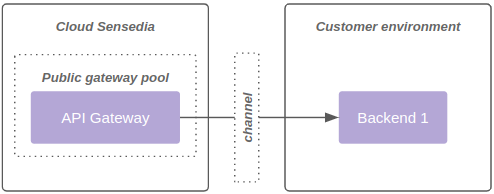
1 - Backend consumption of the public gateway pool, as shown in diagram 1:
2 - Consumption of the private gateway pool, as shown in diagram 2:
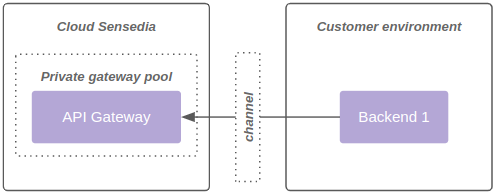
| A gateway pool cannot be public and private at the same time. |
Positive aspects
Most recommended model due to practicality and resilience.
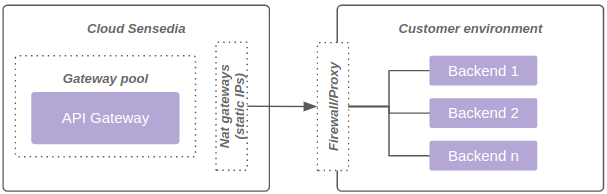
Each data plane has at least 2 fixed outbound IPs. These IPs can/should be used for customer-side firewall controls.
To further enhance security, an mTLS strategy can be used between the gateways and the backend.
Cost already included in standard offers.
Limitations
It is not possible to access backends without externalization through a proxy or similar technology.
The diagram below represents connectivity through Allow list:
Positive aspects
Model with private access, ensuring secure communication between Gateways and Backends.
Attention points
Shared responsibility between Sensedia and the customer for configuring and maintaining connectivity.
SLA may differ for environments with VPN due to a higher incidence of network issues.
Higher setup, maintenance, and troubleshooting costs.
Communication occurs directly between Gateways and Backends, with no support for outbound NAT.
Gateways operate in an auto-scaling environment, which means that new IPs can be dynamically assigned within the configured range. Therefore, the entire range of IPs allocated to the data plane must be allowed, making it impossible to allocate only specific IPs (e.g., /32).
Limitations
Each data plane can connect to up to 4 networks, limited to 8190 IPs.
BGP (Border Gateway Protocol) is not supported in the current model.
There is no native support for NAT, which means that the communication between Gateways and Backends always occurs with the Gateways' original IPs.
The diagram below represents connectivity through VPN:
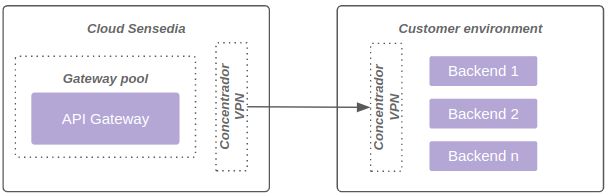
Private connectivity through Site-to-Site VPN runs on the managed VPN service of the cloud provider hosting the customer’s data plane (AWS, GCP, or OCI). In none of the three providers does this managed service offer configurable NAT at the tunnel egress as a native part of the offering:
AWS Site-to-Site VPN: NAT is not natively supported by the service, as described in Configure NAT on VPC CIDR for a Site-to-Site VPN connection.
GCP HA VPN: there is an adjacent feature, Hybrid NAT, but it is not automatic — it requires setting up and operating a dedicated subnet, a Cloud Router, and custom NAT rules on top of the VPN.
OCI Site-to-Site VPN/DRG: the Dynamic Routing Gateways documentation recommends not having overlapping CIDRs between networks connected through a DRG, since routing becomes ambiguous.
Where a technical alternative does exist, it reintroduces an extra piece of infrastructure to configure and maintain on top of the VPN — the same kind of operational complexity that standardizing on the managed service aims to avoid.
Furthermore, even when NAT is available, it solves only half of the addressing conflict: it masks the source, but it does not solve the case in which the destination network treats the source range as a local network. In that situation, the packet is never even routed into the tunnel.
Operating NAT at scale also carries well-known operational risks, such as port exhaustion under traffic peaks. We prefer not to take on this type of operational risk as part of the product, keeping Sensedia’s focus on API Management — not on operating network infrastructure tailored to each customer.
The data plane runs on a network that is native to the cloud provider’s VPC/VCN: each Kubernetes pod receives a real routable IP from the network, not a virtual overlay IP. This model is implemented through the VPC CNI (AWS/EKS), alias IP in VPC-native clusters (GCP/GKE), or VCN-Native Pod Networking (OCI/OKE), depending on where the data plane is hosted. In every case, address consumption is not comparable to the "1 or 2 servers" model of legacy infrastructure based on fixed instances.
The points below explain why IP consumption is higher than the number of pods suggests:
This network mode reserves a minimum pool of IPs per node, regardless of how many pods that node is actually running. In the AWS/EKS case, between 12 and 19 reserved IPs per node were measured in real environments. The exact reservation mechanics vary by provider and by CNI, but the principle — consumption per node, not only per pod — applies to all three.
The environment scales automatically on demand. Traffic peaks can add multiple nodes at once, each consuming dozens of additional IPs instantly, even before accounting for the pods that come up with them.
In a real case (AWS/EKS), an environment with only 4 baseline nodes and around 50 system pods — still without production traffic — had already consumed 60 private IPs.
| Sensedia’s standard technical recommendation is a minimum dedicated /23 range per new data plane. A smaller range reduces the safety margin for autoscaling and rolling updates, increasing the risk of subnet exhaustion. Accepting this risk is the customer’s decision, but it is not Sensedia’s recommendation. |
When there is an IP conflict between the customer’s network and the data plane range, the alternatives are:
Check whether an equivalent service exists in a non-conflicting network on the customer’s side.
Provision a new data plane with its own range (minimum /23) and migrate through a controlled cutover.
|
Private DNS resolution — pointing the platform to the customer’s internal DNS servers through the private connectivity — is a separate additional customization, described in Customization: private DNS resolution for the backend. Additional customization requests (such as NAT) to sustain that customization are assessed with caution, prioritizing structural solutions — such as a data plane with its own range — over an accumulation of one-off exceptions. |
Positive aspects
Stability and resilience.
Simplified setup.
Attention points
Offer available only to customers whose backend is also allocated on AWS.
Limitations
Each data plane can be connected to up to 4 networks, limited to 8190 IPs.
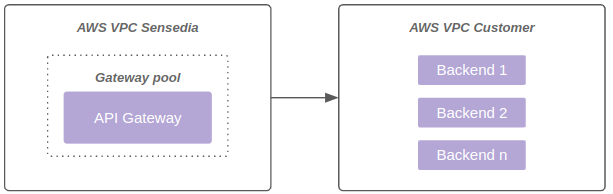
The diagram below represents connectivity through VPC Peering:
Positive aspects
Possibility to access backends through a private link.
No need to use VPN.
Greater communication flexibility between VPCs.
Within AWS limits, regarding Transit Gateway and connectivity, essential points are adjustable.
For more information, see the AWS Transit Gateway Limits documentation.
Attention points
Customer must share AWS Transit Gateway with the Sensedia account.
Need to create routes on the Sensedia side and on the client side.
The AWS billing fee applies on both sides (Customer and Sensedia), as AWS charges per VPC attached to the AWS Transit Gateway.
Limitations
Each data plane can receive up to 5 unique AWS Transit Gateway attachments.
AWS Transit Gateway limits also apply.
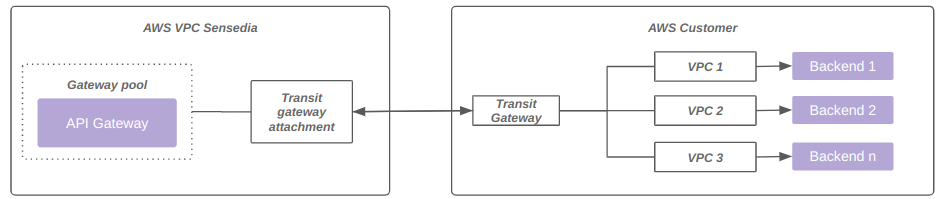
The diagram below represents connectivity through Transit Gateway:
| For more information on the process of establishing connectivity using AWS Transit Gateway, visit this link. |
Positive aspects
Possibility to access backends through a private link.
Attention points
Cost.
Shared responsibility model between Sensedia, the customer, and the link provider.
Limitations
Each data plane can be connected to up to 4 networks, limited to 8190 IPs.
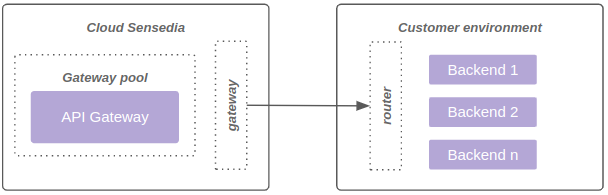
The diagram below represents connectivity through Direct Connect:
| Networks above 8190 hosts (/19) are not supported. |
Positive aspects
Facilitates communication between components on AWS.
Ensures private access with high resiliency.
For more information, see official AWS documentation.
Negative aspects
Requires exposure through NLB on the customer side.
Private DNS name
As per the AWS documentation, it is possible to use a name with a custom domain (<service>.customer.com.br, for example) in the endpoint service.
This name is considered private because AWS registers it in a DNS zone local to the VPCs connected to the endpoint service.
The advantage is being able to consolidate the service exposure under a unique name for different service consumers.
For customers wishing to use this functionality, it is necessary to enable and validate the endpoint service to use the selected name. Once configured, the customer must open a ticket with Sensedia support, requesting the activation of the private DNS name and providing the relevant endpoint service information.
Limitations
Up to 4 VPC endpoints (powered by AWS Private link) are supported per data plane.
The diagram below represents connectivity using VPC endpoint powered by AWS Private link:

Additionally, it is possible to use the same VPC endpoint associated with the same load balancer, with multiple ports and target groups. The diagram below represents this model:

By default, the platform resolves only publicly resolvable backend hostnames.
In environments that already use one of the private connectivity models above (VPN, Direct Connect, VPC Peering, or Transit Gateway), it is possible, as an additional customization, to configure backend hostname resolution directly against the customer’s private DNS servers, reached through that same connectivity.
| This customization requires one of the private connectivity models above (VPN, Direct Connect, VPC Peering, or Transit Gateway) to be already established between the environment and the customer’s network — regardless of the connectivity model used by the gateway pool for API traffic. Without private connectivity already active, there is no way to reach the customer’s private DNS. |
Before implementation, a risk acceptance document must be formally signed off, covering:
Conditional availability — resolution becomes dependent on the stability of the private connectivity and of the customer’s DNS server.
Additional latency — the extra resolution hop may impact the response time of calls.
SLA isolation — Sensedia’s SLA does not cover failures originating in DNS or in connectivity managed by the customer.
More complex troubleshooting — the root cause may lie outside the environment managed by Sensedia.
Exposure to environment updates — platform migrations or upgrades may require reconfiguring the customization.
Possible future discontinuation — should Sensedia offer an equivalent native solution, the customization may be discontinued with prior notice.
| This customization does not include outbound NAT or a fixed outbound IP. As detailed in the sections above (see Why there is no outbound NAT on the VPN), the private connectivity models do not offer NAT — this holds even when private DNS resolution is enabled. |
To assess eligibility and start the risk acceptance process, contact Sensedia support.
Share your suggestions with us!
Click here and then [+ Submit idea]